How to Print From Your Phone: iPhone and Android
 By the Smart Printer team · Updated · 4 min read
Short answer
On an iPhone, open Smart Printer, pick a photo or file and tap Print: the app finds your printer on Wi-Fi without drivers. On Android, open the file, tap Menu or More, then Print, and pick your printer. Either way, the phone and printer need 1 shared Wi-Fi network. The table below compares 5 ways to print.
Contents
- Can you print from your phone?
- How do I print from my phone if it's an iPhone?
- How do you print from your phone on Android?
- How to print something from your phone: five ways compared
- Print from phone to printer without a router
- Can I print something from my phone besides photos?
- When nothing prints
- Print from phone questions
Can you print from your phone?
Yes. Most Wi-Fi printers accept jobs from a phone, and many also work with the maker's own app. You need three things:
- A printer with Wi-Fi turned on and joined to your home or office network.
- A phone on that same Wi-Fi network. Guest networks and mobile data can't reach the printer.
- Paper and ink or toner in the printer.
How do I print from my phone if it's an iPhone?
Smart Printer is the fastest way. It looks for the printer on your network itself, so there is nothing to pair.
- Install Smart Printer from the App Store and open it.
- Wait a few seconds while the app finds your printer, then tap its name.
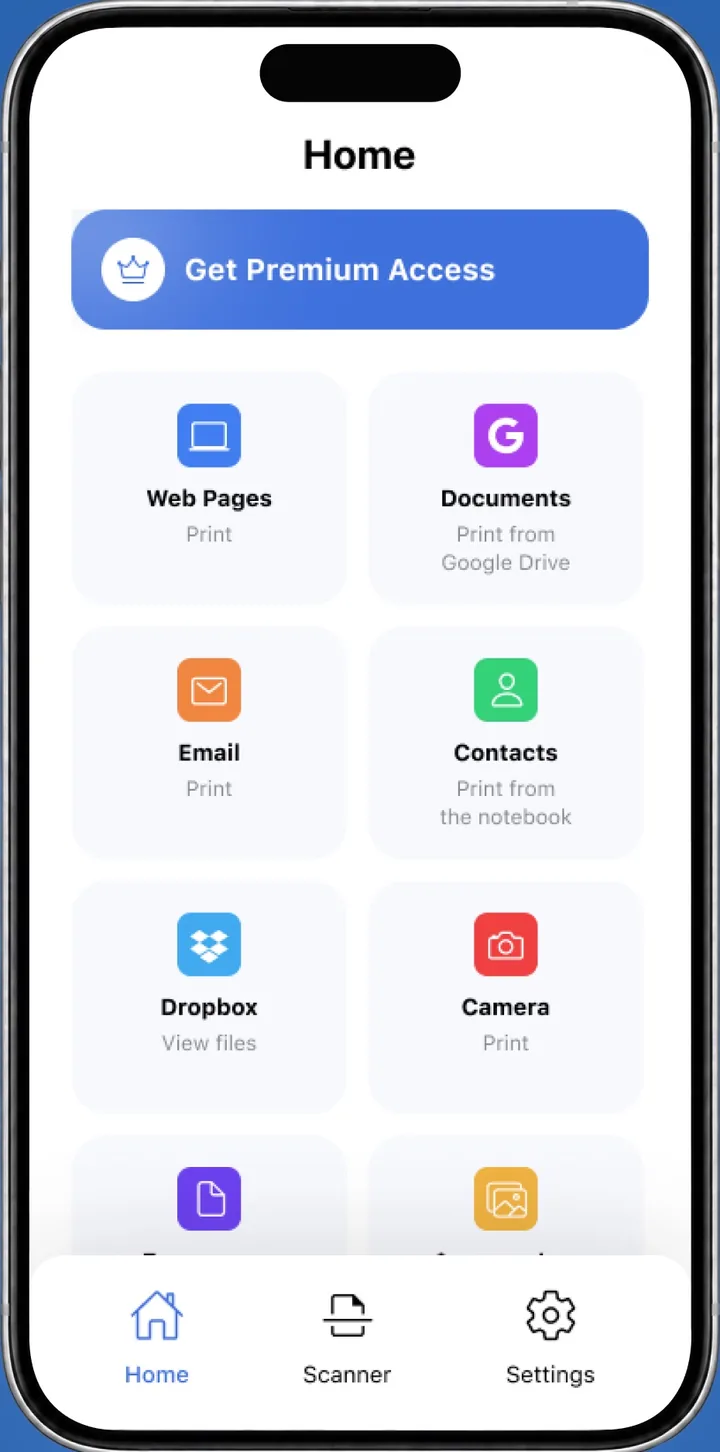
- Choose what to print: a photo, a PDF, a file from Files, Google Drive or Dropbox, an email or a web page.
- Set copies, paper size and orientation, then tap Print.
Prefer the built-in way? Open the app you are printing from, tap Share or Actions, scroll down and tap Print. Tap No Printer Selected, choose an AirPrint printer and tap Print in the upper-right corner. Apple explains it in Use AirPrint to print from your iPhone or iPad.
AirPrint needs a printer that supports it. If yours doesn't, read how to print without AirPrint.
How do you print from your phone on Android?
Android prints through a print service that runs in the background. Most phones have one turned on already.
- Open the file or photo in its app. Tap Menu or More, then Print. In some apps, tap Share first.
- At the top of the preview, tap the down arrow and pick your printer.
- Tap the down arrow again to set copies and paper size, then tap the Print button.
- No printer in the list? Open Settings > Connected devices > Connection preferences > Printing and turn on a print service, such as Default Print Service.
Still empty? Install Mopria Print Service from Google Play or your printer maker's app, such as the HP app or Epson Smart Panel. Menu names differ by phone maker and Android version. Mopria describes the service on its Print From Android page.
If an app has no print option, take a screenshot of the screen and print the image.
How to print something from your phone: five ways compared
| Method | Works on | What it needs |
|---|---|---|
| Smart Printer | iPhone and iPad | A printer on the same Wi-Fi, no drivers |
| AirPrint | iPhone and iPad | A printer that supports AirPrint |
| Default Print Service | Android | A Wi-Fi printer on the same network |
| Mopria Print Service | Android | A Mopria-certified printer |
| Maker app | iPhone and Android | A printer from that brand |
Print from phone to printer without a router
Some printers can create their own Wi-Fi network, called Wi-Fi Direct. You join it from the phone and print as usual. Some printers also print from an Android phone over a USB cable and an OTG adapter, through the maker's print plugin.
The steps are in our guide on how to connect a printer to a phone.
Can I print something from my phone besides photos?
Yes. Phones print far more than pictures:
Smart Printer handles all of these from one app on iPhone and iPad.
- Photos, screenshots and camera snapshots.
- PDFs and files from cloud storage.
- Emails and attachments.
- Web pages and text copied to the clipboard.
- Contacts and scanned paper.
When nothing prints
A printer that doesn't show up is usually on another network or asleep. Our guide on why you can't print from your phone lists every cause, and AirPrint not working covers iPhone cases.
What to remember
- Put the phone and the printer on the same Wi-Fi network first.
- On iPhone, Smart Printer finds the printer and prints in a few taps.
- On Android, tap Menu or More, then Print, and use the built-in print service.
- No router? Try Wi-Fi Direct, or a USB OTG cable on some Android setups.